
Views expressed are my own and not those of my employer.
Why This Matters
Logs that nobody reads are decoration. Logs that only exist on the machine that got compromised are worse: an attacker with root deletes them first.
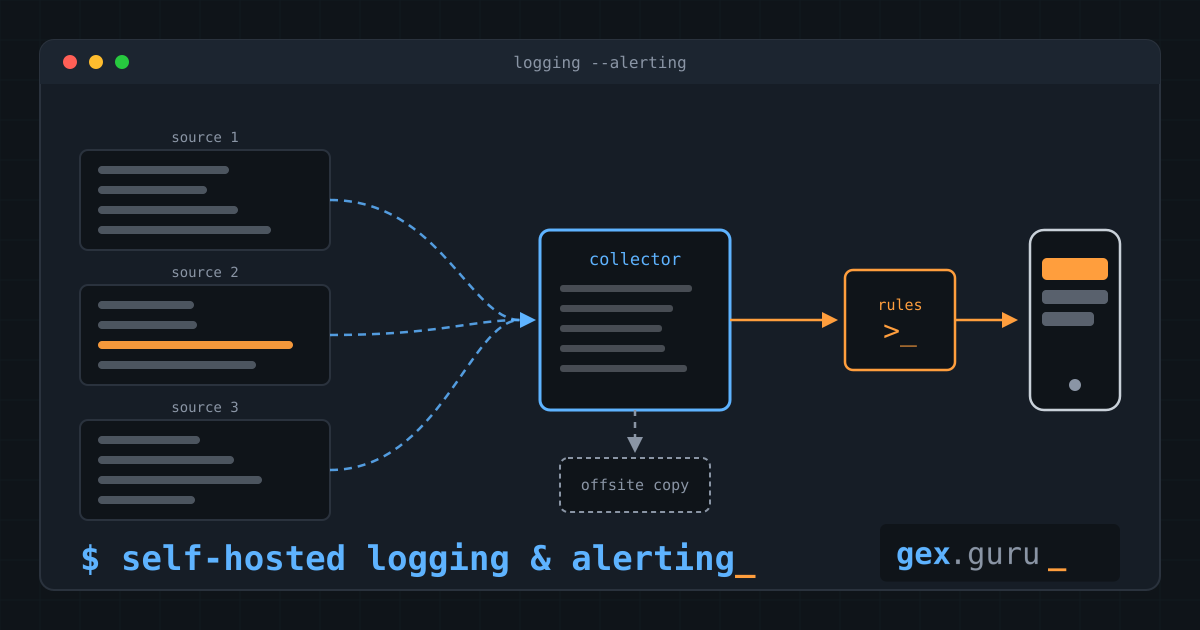
I run several sites and a handful of public-facing services. Security-relevant events (logins, authentication failures, firewall changes, mail) were scattered across all of them. I wanted two things: an alarm on my phone when something looks wrong, and a copy of the evidence that an attacker on a single host cannot touch.
This post covers the basis: what the pieces are, why they are wired the way they are, and what went wrong on the way. The detection rules get their own post.
Architecture
 hosts / containers            site collector                 offsite copy
┌──────────────────┐        ┌──────────────────────┐        ┌───────────────┐
│ journald         │        │ auth proxy           │        │ small VPS,    │
│   └─ agent ──────┼─write─▶│   └─ log store       │─copy──▶│ second        │
│ (write-only)     │  only  │ rule engine          │        │ provider      │
├──────────────────┤        │   └─ alertmanager ───┼─push─▶ phone
│ firewall ── syslog ──────▶│                      │
└──────────────────┘        │ heartbeat ───────────┼─ping─▶ external dead man's switch
                            └──────────────────────┘
- One collector per site. Alarms keep working when the WAN link or the offsite copy is down.
- One offsite copy on a small VPS at a different provider. It cannot be wiped from a compromised host, and it survives the loss of a whole site.
- Agents are write-only. A compromised host can add log lines, but it cannot read or delete anything.
- Firewalls ship their own syslog. No agent on the firewall.
Software: VictoriaLogs as the store, Vector as the agent, vmalert for rules, Alertmanager, Pushover for the phone, Healthchecks.io as the external watchdog. I run the collector in an LXC on Proxmox — here’s why.
The Decision: Local Collector Plus Offsite Copy
I looked at four shapes.
| Option | Good | Bad |
|---|---|---|
| Collector per site only | Independent, simple | Logs can be wiped, no overall picture |
| One central server only | Overall picture, tamper-resistant | Single point of failure, depends on the WAN |
| Host agents with file integrity (SIEM-style) | Covers file changes too | High operational effort for one person |
| Hosted SIEM | Little to run | Cost, logs leave my control |
I took the first two together. Alarms are evaluated locally, so a broken link does not silence them, and the security logs are copied offsite, so a compromised host cannot erase the trail. The price is two systems to maintain. For file integrity I use the tools the OS already ships instead of a full agent stack.
Deep-Dive
Write-only agents
Every agent talks to the collector through an authenticating proxy. The agent identity may only call the insert path. Reading and deleting need a different identity that never lives on an agent host.
The proxy config has two identities. Passwords come from the environment, never from the file:
# Two identities in front of the log store.
# "agent" can only write. "reader" is for dashboards and the rule engine.
users:
  - username: agent
    password: "%{LOG_AGENT_PASSWORD}"
    url_map:
      - src_paths: ["/insert/.*"]
        url_prefix: "http://localhost:<store-port>/"

  - username: reader
    password: "%{LOG_READER_PASSWORD}"
    url_prefix: "http://localhost:<store-port>/"
The agent ships the journal and buffers to disk, so a collector outage or a reboot does not lose lines:
# Vector agent: ship the local journal to the collector. Write-only by design (see vmauth).
data_dir: /var/lib/vector

sources:
  journal:
    type: journald
    current_boot_only: true

sinks:
  collector:
    type: http
    inputs: [journal]
    uri: "https://logs.example.com/insert/jsonline?_stream_fields=host,SYSLOG_IDENTIFIER&_msg_field=message&_time_field=timestamp"
    method: post
    compression: gzip
    encoding:
      codec: json
    framing:
      method: newline_delimited
    auth:
      strategy: basic
      user: agent
      password: "${LOG_AGENT_PASSWORD}"   # injected via environment file, mode 0600
    buffer:
      type: disk          # survive collector downtime and reboots
      max_size: 536870912
      when_full: block
Silence is a finding
The most common way a logging setup fails is that it stops logging, and nobody notices. So the setup watches itself in two layers:
- One silence rule per expected source. If a host stops sending, it alarms.
- A heartbeat through the whole chain. A small timer writes a line, the line travels journald → agent → store → rule engine → Alertmanager, and the result pings an external dead man’s switch. If any link breaks, including the alerting host itself, the external service tells me.
One thing I learned the annoying way: quiet hosts do not produce enough logs to satisfy a silence rule. The first silence alarm fired minutes after I had rolled out an agent to a host that simply had nothing to say. The fix is a heartbeat timer on every agent. The rules look like this:
groups:
  - name: chain-health
    interval: 1m
    rules:
      # The heartbeat only reaches this rule if the WHOLE chain works:
      # journald -> agent -> store -> rule engine. Alertmanager forwards it to an external dead man's switch.
      - alert: Watchdog
        expr: '_time:5m SYSLOG_IDENTIFIER:=log-heartbeat host:=collector | stats count() n | filter n:>0'
        labels:
          severity: none

      # Silence is a finding. One rule per expected source.
      # Pick a window longer than the longest gap your quietest host can produce.
      - alert: LogSilence
        expr: '_time:15m host:=web-01 | stats count() n | filter n:<1'
        labels:
          severity: critical
          host: web-01
        annotations:
          summary: 'No logs from web-01 for 15 minutes'
Alert routing
Critical events go to my phone with high priority. Everything else arrives quietly. Recoveries are sent too, as low-priority “resolved” notices, so I know an alarm ended without opening a dashboard.
route:
  receiver: pushover-normal
  group_by: [alertname, host]
  group_wait: 10s
  group_interval: 5m      # also the reason "resolved" notices can lag behind the real recovery
  repeat_interval: 4h
  routes:
    - matchers: [alertname="Watchdog"]
      receiver: deadmans-switch
      group_wait: 0s
      group_interval: 1m
      repeat_interval: 1m
    - matchers: [severity="critical"]
      receiver: pushover-critical

receivers:
  - name: deadmans-switch
    webhook_configs:
      - url_file: <secrets-dir>/deadmans_ping_url
        send_resolved: false

  - name: pushover-normal
    pushover_configs:
      - user_key_file: <secrets-dir>/pushover_user_key
        token_file: <secrets-dir>/pushover_app_token
        priority: '{{ if eq .Status "resolved" }}-1{{ else }}0{{ end }}'

  - name: pushover-critical
    pushover_configs:
      - user_key_file: <secrets-dir>/pushover_user_key
        token_file: <secrets-dir>/pushover_app_token
        priority: '{{ if eq .Status "resolved" }}-1{{ else }}1{{ end }}'
        title: '{{ if eq .Status "resolved" }}RESOLVED{{ else }}CRITICAL{{ end }}: {{ .CommonLabels.alertname }} ({{ .CommonLabels.host }})'
All four files are also in the examples folder of the content repo.
A detail that cost me time while testing: Alertmanager batches notifications per group. The alarm arrives quickly, but the “resolved” notice can show up many minutes after the rule actually cleared. When I tested with a throwaway login, I assumed the resolved message had been lost and went looking for an error that did not exist.
Where It Went Wrong
A placeholder became a rule. The rule file is rendered from a template. When a value was missing, the template did not fail. It produced a rule in which every SSH login counted as unexpected. Every login became a critical alarm. That one was loud. Since then the installer refuses to render when a placeholder is left over.
The quiet failure is worse. My SSH alarm looked at one daemon name. Newer OpenSSH releases split the daemon, and newer Debian hosts log under a different name. On those hosts the alarm could never match. It was not wrong, it was blind, and nothing told me. I only found it because I measured the rule against seven days of real logins before changing it. The old rule had missed most of them.
The lesson I took from that: after changing an alert, replay it against real history, and then trigger it for real once. A rule that is syntactically valid and never fires looks exactly like a rule that is working.
My own tooling could produce the same silent failure. I built a small script that renders the rules without running the full installer. A review found that it could exit cleanly while producing a rule that never fires, for example when a variable was renamed upstream. The script now checks its output (no empty values, no leftover placeholders, the same set of alerts as before) and aborts otherwise.
The Defaults I Apply to the Collector
Every host I run gets the same baseline. The collector is no exception, because a logging server that is itself unpatched or unwatched defeats the point.
CrowdSec agent, reporting to the firewall. No local decision engine, no bouncer on the collector. The agent reads the SSH logs and reports to the central API on the firewall, which does the blocking. After installing it I checked that its parser understands the renamed SSH daemon, the same trap that bit my alert. cscli explain takes a sample line and shows which parsers handle it, so I could test both daemon names without a single real failed login, which could have gotten my own address blocked.
Unattended upgrades. The package is not enough on its own, so I verified that the timers fire and the policy is on:
APT::Periodic::Update-Package-Lists "1";
APT::Periodic::Unattended-Upgrade "1";
Monitoring, with one deliberate exception. My standard is three layers: an external uptime check, a blacklist check, and internal metrics. The collector has no public endpoint, so the first two have nothing to look at. What watches it from outside is the heartbeat through the whole chain, which tells me more than a ping would. Internally it runs Netdata.
I got one thing wrong here. Netdata’s default is to listen on all interfaces, with an unauthenticated dashboard, and I found it that way on the machine that holds my security logs. The fix is two lines:
[web]
    bind to = 127.0.0.1
Cloud connectivity still works, because the agent connects outward. I wrote the exception down as a decision record so that “why does this host not have all three?” has an answer next time.
Where My AI Assistant Struggled
I did this work with Claude, and it was useful for the measuring and cross-checking. It also made the usual mistakes. It claimed “live equals template” based on a diff in which both sides came from the same file, which proves nothing. A second review caught that, and I corrected the claim in my docs. Treat “the diff is empty” with suspicion whenever you know where the inputs of the diff came from.
What’s Next
The basis works: logs are collected, copied offsite, watched for silence, and alarms reach my phone. Next up is the detection layer: what to alert on, how to keep it quiet enough to stay trusted, and how to test a rule without waiting for an attacker.